Skip to content
View in the app

A better way to browse. Learn more.

Ford XR6 Turbo.com

A full-screen app on your home screen with push notifications, badges and more.

To install this app on iOS and iPadOS
  1. Tap the Share icon in Safari
  2. Scroll the menu and tap Add to Home Screen.
  3. Tap Add in the top-right corner.
To install this app on Android
  1. Tap the 3-dot menu (⋮) in the top-right corner of the browser.
  2. Tap Add to Home screen or Install app.
  3. Confirm by tapping Install.

Been a long time!!!!

Featured Replies

#1

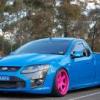
Hey guys. Been such a long time since I've been on the forums. How is everyone? Last time I had any contact was ages ago!!!

Smurfs still in action, well wasn't for 2 years as I was rebuilding bigger and better. Anyone in Sydney? 

29-Jul-SMURF6-43.jpg

29-Jul-SMURF6-30.jpg

29-Jul-SMURF6-54.jpg

29-Jul-SMURF6-35.jpg

29-Jul-SMURF6-20.jpg

#4

Steering wheel and dash are on point 🤩

#5

Well aint that just a bit fancy.

That steerign wheel is something else.


I thought I'd gone far enough, this is next level

Good to see its still aorund.

  • 5 weeks later...
#7

How much meff do you sell?

#8

Are those lights on the steering wheel?

#9

I just jizzed 

Create an account or sign in to comment

Recently Browsing 0

  • No registered users viewing this page.

Account

Navigation

Search

Search

Configure browser push notifications

Chrome (Android)
  1. Tap the lock icon next to the address bar.
  2. Tap Permissions → Notifications.
  3. Adjust your preference.
Chrome (Desktop)
  1. Click the padlock icon in the address bar.
  2. Select Site settings.
  3. Find Notifications and adjust your preference.