Skip to content
View in the app

A better way to browse. Learn more.

Ford XR6 Turbo.com

A full-screen app on your home screen with push notifications, badges and more.

To install this app on iOS and iPadOS
  1. Tap the Share icon in Safari
  2. Scroll the menu and tap Add to Home Screen.
  3. Tap Add in the top-right corner.
To install this app on Android
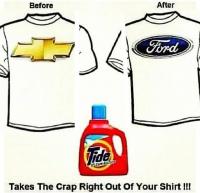
  1. Tap the 3-dot menu (⋮) in the top-right corner of the browser.
  2. Tap Add to Home screen or Install app.
  3. Confirm by tapping Install.

turbogilly

Legacy Donating Member
  • Joined

  • Last visited

  1. Assetto corsa works as a good sim as well.
  2. with really ugly looking chrome wheels
  3. N/A disguised as a GT?
  4. Mercedes and Ssangyong's love child.
  5. +1 for Nulon full syn 10w-40, I use it in my stock 08 turbo.
  6. thanks for the reply guys, will book the car with you Mick.
  7. Hi Guys, I know Pitlane is good and will be seeing Mick when the tuning time comes but first I want to do a flush of engine, ZF and diff with Mainlube oils also need to install new diff bushes so can anyone please recommend a workshop in Melbourne north where I can go? Thanks
  8. We have a position vacant for a help desk person
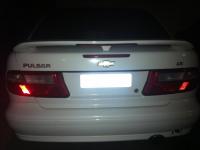
  9. My fellow members please be aware of this hunter, he has Chevy badges and fully sick led tail lights which can make your car bonnet turn red as it has done to my car in the pic.
  10. Best stain remover I guess!
  11. I don't know why this was done, may be to piss off a Chevy lover.
  12. Dad drove a Toyota, had ford Ikon as my first car, and has been driving fords since then.
  13. Comparing apple with oranges, would have been intresting to see how it goes againt xr5 or RS, Auto car UK did the same thing by comparing new M5 with R35.
  14. topic replied to turbogilly's RHR in Audio & Visual
    standard factory sub with JBL gto
  15. JBL gto shallow mount sub and the factory sub.

Account

Navigation

Search

Search

Configure browser push notifications

Chrome (Android)
  1. Tap the lock icon next to the address bar.
  2. Tap Permissions → Notifications.
  3. Adjust your preference.
Chrome (Desktop)
  1. Click the padlock icon in the address bar.
  2. Select Site settings.
  3. Find Notifications and adjust your preference.