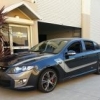
22/08/06 12:46 PM22/08/06 12:46 PM #11 Not bad, I've seen a few people do that, gives it a more sporty bodykit look
22/08/06 02:41 PM22/08/06 02:41 PM #13 Looks good.. Wonder how it would go on a different colour hmm say shockwave??
22/08/06 04:26 PM22/08/06 04:26 PM #14 What camera are you using those pic's are farkin growse. They have a real depth and clarity to them.
22/08/06 07:18 PM22/08/06 07:18 PM #15 I'll give it a yay, 3 more exhaust tips and will look good Clarke
22/08/06 08:39 PM22/08/06 08:39 PM #16 Author What camera are you using those pic's are farkin growse. They have a real depth and clarity to them. ←Nothing fancy just a HP M22 4.0mpix, it was like $200 at bing lee lol
23/08/06 01:06 AM23/08/06 01:06 AM #17 Looks good.. Wonder how it would go on a different colour hmm say shockwave??←I've seen it done on a Phantom in silver/grey and it looked pretty good
23/08/06 01:19 AM23/08/06 01:19 AM #19 I had thought about doing this with the Grey colour used on FPV body kits... looks good mate.If I were to do it I would unclip the extension skirt and do it somewhere away from the car incase of overspray. Good work though
23/08/06 01:41 AM23/08/06 01:41 AM #20 I had thought about doing this with the Grey colour used on FPV body kits... looks good mate.If I were to do it I would unclip the extension skirt and do it somewhere away from the car incase of overspray. Good work though ←Go on then!


Create an account or sign in to comment