Skip to content
View in the app

A better way to browse. Learn more.

Ford XR6 Turbo.com

A full-screen app on your home screen with push notifications, badges and more.

To install this app on iOS and iPadOS
  1. Tap the Share icon in Safari
  2. Scroll the menu and tap Add to Home Screen.
  3. Tap Add in the top-right corner.
To install this app on Android
  1. Tap the 3-dot menu (⋮) in the top-right corner of the browser.
  2. Tap Add to Home screen or Install app.
  3. Confirm by tapping Install.

When 600RWKWs Wasn't Enough!
Featured Replies

#231
  • Author

Danny my friend you need to learn how to read between the lines LOL, you can't expect me to tell you everything all at once now do you Tiger? :beerchug::roflmbo:

Use your imagination & some creativity... :violent085:

I like my Link Better LOL, it's more lets say..................relevant :beerchug:

Edited by SPIKO

  • Replies 289
  • Views 29.9k
  • Created
  • Last Reply

Top Posters In This Topic

Posted Images

#232

Mine was just for Dassult, nothing relevant to the story =)

#233

Are we introducing a manifold..

#234
  • Author

I have always known you to be quite clever EGO, well done.. And yes it will be a revolution :rolleyes:

#235

Isnt HyperTune the same company that makes the Nitto plenums?

#236
  • Author

No comment.... Karl. :beerchug:

#237
  • Author

No comment.... Faahck me....... :beerchug:

#238

Campo's new mustang is one of my favourite cars to watch race, should be interesting with the big block in it now. Dont think it will be very long now till CV has the fastest turbo car in Australia record back in there camp, hopefully they can push it to a 5 sec pass.

#239
  • Author

My thoughts exactly.... :beerchug:

#240

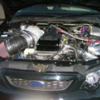
That looks like the new big block setup...... awesome

CHeers Dalesy

Create an account or sign in to comment

Recently Browsing 0

  • No registered users viewing this page.

Account

Navigation

Search

Search

Configure browser push notifications

Chrome (Android)
  1. Tap the lock icon next to the address bar.
  2. Tap Permissions → Notifications.
  3. Adjust your preference.
Chrome (Desktop)
  1. Click the padlock icon in the address bar.
  2. Select Site settings.
  3. Find Notifications and adjust your preference.