Skip to content
View in the app

A better way to browse. Learn more.

Ford XR6 Turbo.com

A full-screen app on your home screen with push notifications, badges and more.

To install this app on iOS and iPadOS
  1. Tap the Share icon in Safari
  2. Scroll the menu and tap Add to Home Screen.
  3. Tap Add in the top-right corner.
To install this app on Android
  1. Tap the 3-dot menu (⋮) in the top-right corner of the browser.
  2. Tap Add to Home screen or Install app.
  3. Confirm by tapping Install.

New Shoes

Featured Replies

#41

High profile Tyres do that! They ride like sh*t around corners cause the sidewall has too much flex...

  • Replies 86
  • Views 12.9k
  • Created
  • Last Reply

Top Posters In This Topic

Most Popular Posts

  • S_hit mate your car just fell down and crushed my keyboard

  • Nah no more news, cbf getting them widened lol... I now want to plasti dip my 19's and put them back on and prob sell the steelies.. The steelies are fun, feels like I have a 400-500 rwkw car hahaha

  • If the rears were wider I'd buy em. No point in me having less traction though as it's already an issue.

Posted Images

#42

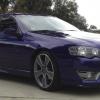
looks good, remove number plates = perfect get away car

#43

U wonna sell em mike how much ? Lol

#44
  • Author

Do my headlining and they're yours hahaha...

#45
  • Author

Hey Daniel if u really were keen on trying them on your car let me know, cause I wanna get rid of them soon..

#46

Dunno if 16's will fit over the front brakes like you said, I think they are a 322mm caliper?

#47

yer daz's headlining looks sik. love the black interior.

#48

Dunno if 16's will fit over the front brakes like you said, I think they are a 322mm caliper?

Hey trainer they are 17s so they will fit your car

#49

17min sixteens wont fit

#50

Hey trainer they are 17s so they will fit your car

Mike said 16's where he posted the new pics daz?

If they are 17's then let me know what you are thinking mike! :thumbsup:

Edited by TRA1NR

Create an account or sign in to comment

Recently Browsing 0

  • No registered users viewing this page.

Account

Navigation

Search

Search

Configure browser push notifications

Chrome (Android)
  1. Tap the lock icon next to the address bar.
  2. Tap Permissions → Notifications.
  3. Adjust your preference.
Chrome (Desktop)
  1. Click the padlock icon in the address bar.
  2. Select Site settings.
  3. Find Notifications and adjust your preference.