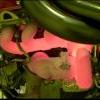
November 8, 200916 yr #1 Paint can used as referencePat is planning somethingsorry for bad phone picks
November 8, 200916 yr #3 So much for the "Nah mate, I won't post it on the forum"...Yeah well I spose its out now. I've been taking it easy on my Atomic bottom end and 500rwhp has started to get a little mediocre these days.
November 8, 200916 yr #6 You do have the power to get rid of it...What are you aiming for Pat, 450-500rwkw? more?
November 8, 200916 yr #7 So what was the big secret....that he's in to chroming? That's sooo yesterday
November 8, 200916 yr #8 Damn, that's a big sucker.... how do you go for bonnet clearance?You do realise that I might have to handicap you on night runs from now on.... just so we can all arrive together you know..... Edited November 8, 200916 yr by BionicXR6T
November 8, 200916 yr #9 Just an exercise in doing something stupid! not sure on power, don't know the exact model of turbo, lets just say it wasn't designed for cars! Got the tzatziki injection and stock injectors ready to get installed, Nick reckons he'll get 530-ish out of it


Create an account or sign in to comment