05/11/10 12:22 AM05/11/10 12:22 AM #31 Author Ordered these plates today the build number of the car is 001
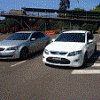
05/11/10 07:38 AM05/11/10 07:38 AM #33 Nice one mate but have seen better my Cobra is better.......... Nah that's hot. I was going to say the back ground in your photos look familiar. I'm also from Wollongong so I'll keep a eye out plus should catch up. Enjoy the car and enjoy your stay.
05/11/10 08:35 AM05/11/10 08:35 AM #34 Funny your is 001, I was looking at 002 last week which is a nice dark blue at Titan Ford in Brookvale.
05/11/10 11:49 AM05/11/10 11:49 AM #35 Looks awesome. Perfect combination of style/sports car. Saw one today on macquarie street (sydney) but only from behind.
05/11/10 05:27 PM05/11/10 05:27 PM #36 I was looking at 002 last week which is a nice dark blue at Titan Ford in Brookvale.http://www.carsales.com.au/all-cars/dealer/details.aspx?Cr=1&R=9472240&keywords=&trecs=13&__Ns=pCar_PriceSort_Decimal|0||pCar_RankSort_Int32|1||pCar_Make_String|0||pCar_Model_String|0&__sid=1285B682A8C5&__Nne=15&__Qpb=true&seot=1&__N=1216%201246%201247%201252%201282%204294770246%204294965879&silo=1011Makes a mockery of their build numbers and completely pointless really doesnt it....


Create an account or sign in to comment