Skip to content
View in the app

A better way to browse. Learn more.

Ford XR6 Turbo.com

A full-screen app on your home screen with push notifications, badges and more.

To install this app on iOS and iPadOS
  1. Tap the Share icon in Safari
  2. Scroll the menu and tap Add to Home Screen.
  3. Tap Add in the top-right corner.
To install this app on Android
  1. Tap the 3-dot menu (⋮) in the top-right corner of the browser.
  2. Tap Add to Home screen or Install app.
  3. Confirm by tapping Install.

Second Run At Calder Tonight.
Featured Replies

#21
  • Author

that sucks I cant tonight. keen for the weeekend?

  • Replies 42
  • Views 3k
  • Created
  • Last Reply

Top Posters In This Topic

#22

it will have to be next sunday, im rostered to work all weekend nxt week

#23

Hi guys,

Nice results at the calder F6rod, I saw your car that night.

Mine didn't wanna go, or most likely I couldnt make it go,as it was my first time at the park, also I had a stupid canopy and managed only 12.9 with 115mph. May see you next time :):unsure:

Cheers

#24
  • Author

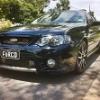
Were you in the silver ute? Hope to see you out there again next time, good to have some cars running same kind of times as mine, motivates me to go faster lol. just btw, the plates say f6rcd, the photo in my sig has a mark on it.

  • 3 weeks later...
#25

May skip this Friday at the track due to prior commitments, I'll try to catch up with you next time :innocent:

#26

Well done Bradles almost a second of your times good effort @ that mph :innocent:

#27

Anybody going to calder tonight?

I'll be there in an FG green XR6T ute

#28

saw your ute there mate how did you end up going? was a few fords out there..

I did a 12.5 @ 118mph 2.0 60ft on street tyres. 326rwkw... manuals are too much work haha.

#29

with our power figures we should get into mid 11s

#30

not with the piss weak irs in there lol.

after seeing a full standard 6sp auto fg xr6t do a 12.8 I wonder why I have a manual!

Create an account or sign in to comment

Recently Browsing 0

  • No registered users viewing this page.

Account

Navigation

Search

Search

Configure browser push notifications

Chrome (Android)
  1. Tap the lock icon next to the address bar.
  2. Tap Permissions → Notifications.
  3. Adjust your preference.
Chrome (Desktop)
  1. Click the padlock icon in the address bar.
  2. Select Site settings.
  3. Find Notifications and adjust your preference.