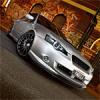
02/01/09 11:18 PM02/01/09 11:18 PM #2 mate they are some amazing shots, cant wait to get some of my T itl be up on my bedroom wall with my dyno sheet
02/01/09 11:22 PM02/01/09 11:22 PM #3 that's pretty impressive work!P.S. VVTI isn't anything to write home about... believe me Edited 02/01/09 11:22 PM02/01/09 11:22 PM by SCRIBR
02/01/09 11:46 PM02/01/09 11:46 PM #6 about level with a Lancer I believe DillzGreat photo's tangcla. you got me stuffed on how you do some of the effects.
02/01/09 11:47 PM02/01/09 11:47 PM #7 Author still cant wait til u head up here to brissyAll it takes is a signed petition with a number of members...
02/01/09 11:48 PM02/01/09 11:48 PM #8 Author Great photo's tangcla. you got me stuffed on how you do some of the effects.That's my secret haha. but I can tell you they're almost straight out of camera with just very slight tweaks, orange sky included.
02/01/09 11:56 PM02/01/09 11:56 PM #9 gr I want them now lol how many shots do we get again mate? and how long would a printing service take? or how will we get em like email etc
02/01/09 11:59 PM02/01/09 11:59 PM #10 Author lol!I'll get you each at least five shots, any more depends on if I have the time or the inspiration to do them, depending on car.I can get prints done for an attractive fee, we'll discuss that on the night and I'll get the highres shots sent to you via email.


Create an account or sign in to comment