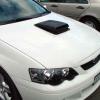
20/10/04 08:07 AM20/10/04 08:07 AM #271 Author Here's a pic of mine againWhich style do you like the mostmacka
20/10/04 08:09 AM20/10/04 08:09 AM #272 The shakers look tops how much and where can I get it done THANKS GUYS
20/10/04 08:32 AM20/10/04 08:32 AM #275 macka,I prefer the later version. Sitting a bit lower certainly helps the overall look of the shaker. This is one of the best mods (aesthetic and functional) I've seen for a T. Good work
20/10/04 08:42 AM20/10/04 08:42 AM #276 Macka, at first when I saw your "lowered" shaker, I thought "yeh that looks better"but now after seeing the original on a Blood Orange car, I'm not so sure .........They both look great!! Great work.Mark.
20/10/04 08:47 AM20/10/04 08:47 AM #277 Author I still think the new version still looks better, the origial certainly looks more agressive though. I think they both look awesome Looks great on the Blood Orange too, don't you think. macka
20/10/04 08:48 AM20/10/04 08:48 AM #278 What do thinl George,Here's another What do l think .......I LOVE ITMacka stop teasing me and put one on my car
20/10/04 08:56 AM20/10/04 08:56 AM #280 Which one GeorgeNew Or Old stylemacka New style looks higher right Macka....still looks nice, either one for me.Didn't your parents teach you that teasing people isn't very nice


Create an account or sign in to comment