Skip to content
View in the app

A better way to browse. Learn more.

Ford XR6 Turbo.com

A full-screen app on your home screen with push notifications, badges and more.

To install this app on iOS and iPadOS
  1. Tap the Share icon in Safari
  2. Scroll the menu and tap Add to Home Screen.
  3. Tap Add in the top-right corner.
To install this app on Android
  1. Tap the 3-dot menu (⋮) in the top-right corner of the browser.
  2. Tap Add to Home screen or Install app.
  3. Confirm by tapping Install.

Down 5 Psi Down Low Mid Range
Featured Replies

#1

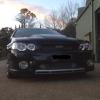
Down low mid range boost is about 5 psi less then normal at 3000. About 400nm torque I have lost. Boost will pick up around 4000 now . It use to pick up at 2800. Blow valve has been disconnected hoping it was the issue, idol is now rough, and will stall here and there, wastegate seems fine. Checked piping seems to look fine. Need to make up some ends up so I can pressure the cooler and intercooler pipes to prove its fine. Tommorow I'm disconnecting the waste gate actuator line so it will just keep boosting. And probably pull the wastgate apart to see if. If it's craped it self. The wastegate is only 8000kms old. Got any suggestions I'm also thinking might have skipped a tooth because of idol now playing up

#2

Did it idle rough before the BOV was disconnected? If not you might have created a vacuum leak. If it did you still might have a vacuum leak of some sort, which would be an air leak post throttle body and covers all vacuum hoses, so check if any blew off or are cracked/perished. If its just taking a long time to spool look for a charge pipe leak, ie from turbo outlet to throttle body - quite often its a silicone hose half dislodged, or a crack in the intercooler if you bumped it in a car park or something like that.

Edited by luke187

#3

Broken hose clamp!

#4
  • Author

Hose clamp And injector failure is what I found so far

Sent from my iPhone using Tapatalk

Create an account or sign in to comment

Recently Browsing 0

  • No registered users viewing this page.

Account

Navigation

Search

Search

Configure browser push notifications

Chrome (Android)
  1. Tap the lock icon next to the address bar.
  2. Tap Permissions → Notifications.
  3. Adjust your preference.
Chrome (Desktop)
  1. Click the padlock icon in the address bar.
  2. Select Site settings.
  3. Find Notifications and adjust your preference.