December 16, 200817 yr #21 Nice power curve dude... Must feel nice and strong on the road!Iv heard the 6boost manifolds are absolutely gold too.
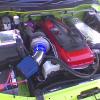
December 16, 200817 yr #22 Author got to love it. its a hoot running aound at that power. Is it bf or ba. Just working out why they would of held it up if its a bf. reason I ask is that's what the tuners done to mine they just picked a number & stopped. Any more plans for it?Whats the high mount manifold youve put in? got a pic?cheers mate it is a bf1, and runs 340-345 daily not the 373.3kw tune. I just wanted 2 see 500rwhp that's all. I will build it soon I think, and yer heres a pic man.
December 16, 200817 yr #23 Author and thanx heaps guys, mr bogan hope u can run that 11 pass real soon !!
December 17, 200817 yr #27 what was the reason you went for this manifold? did you see any benefits from it??? was it a costly exercise?dont mind my thousand questions always curious to see how people get there cars to the point they have especially when its a different route to what ive taken.
December 17, 200817 yr #28 Author stocka is just a poor design, cylinders run lean. this mani proved 2 spool quicker, make more power with less boost and work more efficiently overall. high mounts are a hell of a lot easier 2 work on aswell haha.


Create an account or sign in to comment