Skip to content
View in the app

A better way to browse. Learn more.

Ford XR6 Turbo.com

A full-screen app on your home screen with push notifications, badges and more.

To install this app on iOS and iPadOS
  1. Tap the Share icon in Safari
  2. Scroll the menu and tap Add to Home Screen.
  3. Tap Add in the top-right corner.
To install this app on Android
  1. Tap the 3-dot menu (⋮) in the top-right corner of the browser.
  2. Tap Add to Home screen or Install app.
  3. Confirm by tapping Install.

I Bought One! =)

Featured Replies

#1

Hello all!

I'm a first time poster but a long time reader (btw... I thank a lot of you for all the great info) and I finally bought a xr6 turbo, after looking at so many!

Here is some info on it...

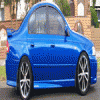
2005 FORD FALCON BA Mk II XR6 Turbo

6SPD manual

lux pack (dual climate control, leather, premium sound, sun roof, 18" alloys, tow bar, side air bags, mp3 plug, tinted windows)

30,000 KMS on the clock

Shockwave

Now just wondering what mods to do first? :gooff:

  • Replies 20
  • Views 2k
  • Created
  • Last Reply

Top Posters In This Topic

Posted Images

#2

EDIT!!!!!!!!!!!

Car sounds good Well done

#3

Pics damn it!!!!

( Congrats on the car :censored: )

#4

:censored: 's

Welcome & :censored:

#5

Congrats on the new ride. Have fun :censored:

#6

Congrats dude.

Get the friggin camera onto it!!!

#7

congrats mate and where are the pcs

#8

Nice work. Anything planned for it yet?

#9

:tonguepoke:

mate, drop into one of our damn fine sponsors threads, and purchase yourself a generic CAPA flash box, tune it in, and go for a drive...

:spoton:

#10

that's the exact car I was looking for... lux pack 6spd manual... but alas there doesnt seem to be any in NZ so I had to go for the auto. Not that I regret it its a great box. If u dont mind me asking what is it worth? just curious to compare across the ditch pricing.

Create an account or sign in to comment

Recently Browsing 0

  • No registered users viewing this page.

Account

Navigation

Search

Search

Configure browser push notifications

Chrome (Android)
  1. Tap the lock icon next to the address bar.
  2. Tap Permissions → Notifications.
  3. Adjust your preference.
Chrome (Desktop)
  1. Click the padlock icon in the address bar.
  2. Select Site settings.
  3. Find Notifications and adjust your preference.