Skip to content
View in the app

A better way to browse. Learn more.

Ford XR6 Turbo.com

A full-screen app on your home screen with push notifications, badges and more.

To install this app on iOS and iPadOS
  1. Tap the Share icon in Safari
  2. Scroll the menu and tap Add to Home Screen.
  3. Tap Add in the top-right corner.
To install this app on Android
  1. Tap the 3-dot menu (⋮) in the top-right corner of the browser.
  2. Tap Add to Home screen or Install app.
  3. Confirm by tapping Install.

Up A Mountain, Down A Beer

Featured Replies

#1

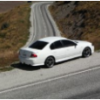
Went for a drive up coronet peak (a mountain near my house) and took some photos of the t and surroundings... think they came out pretty well, although I have reduced the size to post them and couldn't use photoshop so quality not so good. but you get the idea ... anyway :wub::verysad:

KIF_1317.jpg

KIF_1320.jpg

KIF_1323.jpg

KIF_1324.jpg

KIF_1325.jpg

KIF_1327.jpg

KIF_1332.jpg

KIF_1334.jpg

post-150-1218372864_thumb.jpg

#2

I wish I had my T when I went to NZ... beutifull country with some awsome roads

nice pics mate :)

#3

Nice looks like some awesome driving roads. Love the 4th pic :verysad:

#4

Noice pics :spoton:

#5

Awsome pics (love the last one)

#6

They are some awesome pics mate! I wish I had mountain passes near my place!

#7
  • Author

yea the last one is my fave... took them all and as I was driving back down past that 15km bend ahead sign, thought ooo this would make a good foto.... chucked it in R and pulled back... jumped out of car and took it... funny how spur of the moment quick one turned out the best, well in my opinion anyway

#8

Sweet Pics.

Heres one of mine I did when going towards Mt Beauty (I Think)

2598884040101589011S500x500Q85.jpg

#9

Awesome bits of road there! Get any traffic on them?

#10
  • Author

not alot... its the road to the skifield... so in summer only the odd paraglider pilot driving up... obviously in winter its a busy road, but you wouldnt wanna drive a T up there at all, let alone fast

Create an account or sign in to comment

Recently Browsing 0

  • No registered users viewing this page.

Account

Navigation

Search

Search

Configure browser push notifications

Chrome (Android)
  1. Tap the lock icon next to the address bar.
  2. Tap Permissions → Notifications.
  3. Adjust your preference.
Chrome (Desktop)
  1. Click the padlock icon in the address bar.
  2. Select Site settings.
  3. Find Notifications and adjust your preference.