Skip to content
View in the app

A better way to browse. Learn more.

Ford XR6 Turbo.com

A full-screen app on your home screen with push notifications, badges and more.

To install this app on iOS and iPadOS
  1. Tap the Share icon in Safari
  2. Scroll the menu and tap Add to Home Screen.
  3. Tap Add in the top-right corner.
To install this app on Android
  1. Tap the 3-dot menu (⋮) in the top-right corner of the browser.
  2. Tap Add to Home screen or Install app.
  3. Confirm by tapping Install.

My New Gt

Featured Replies

#91
  • Author
nuva shot

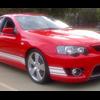
did you lower it Rob? dude if so that looks stock get it on its ass man lol :spoton:

It's been lowered since esseh!

:blink:

I'll try and get some pics today ya mongrel dog!!!

Rob

  • Replies 92
  • Views 12.4k
  • Created
  • Last Reply

Top Posters In This Topic

Posted Images

#92

You don't muck around, do ya Rob?! What's next then? :spoton:

#93
Nice car mate, what mods yo doing.

Thanks mate, sorry for the quick reply.

I'm planning on supercharging it at some stage. The whipple is top stuff, but very exxy IMO. Might just find a cheap noisy centrifugal.

Trust me you won't regret a blower.

Create an account or sign in to comment

Recently Browsing 0

  • No registered users viewing this page.

Account

Navigation

Search

Search

Configure browser push notifications

Chrome (Android)
  1. Tap the lock icon next to the address bar.
  2. Tap Permissions → Notifications.
  3. Adjust your preference.
Chrome (Desktop)
  1. Click the padlock icon in the address bar.
  2. Select Site settings.
  3. Find Notifications and adjust your preference.