15/04/05 07:39 AM15/04/05 07:39 AM #231 These are available on the RTA website.If anyone wants them then buy me a beer. Damo
16/04/05 02:20 AM16/04/05 02:20 AM #232 I just picked up my new plates 'TURBOXR'. Fair enough im in the nt though. Ive seen XRTURBO up here too.that's a wierd co-incidence!Mick (NT TURBO) has XR TURBO on his! <{POST_SNAPBACK}>Smee
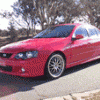
17/04/05 12:22 AM17/04/05 12:22 AM #234 Heres mine, hope the pic works hehe<{POST_SNAPBACK}>Gee I know of somebody else who has them plates, in NSW I think..... can't quite remember though
17/04/05 01:19 AM17/04/05 01:19 AM #235 Heres mine, hope the pic works hehe<{POST_SNAPBACK}>Gee I know of somebody else who has them plates, in NSW I think..... can't quite remember though <{POST_SNAPBACK}>Its no problem Im in NZ.
20/08/05 08:30 AM20/08/05 08:30 AM #237 I am trying to decide wat to get for my ED either WIK-55Y or EDC-00L
20/08/05 09:25 AM20/08/05 09:25 AM #238 Night after I had my stage 1 done, driving back to the Melbourne apartments, wife was asleep in the passenger seat, along comes a wrx with "PLANE-1" plates, stopped beside me at the intersection. The game was played at 2 intersections, and I finished it each time....


Create an account or sign in to comment