February 22, 200323 yr #16 Author Last one. Of what else but the most important thing, that wicked engine.
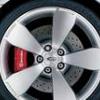
February 22, 200323 yr #17 Great Pics, Mondie!! & TOP car!...Do you know if the premium brakes are the same as the standard GT ( Pursuit) brakes?... Maybe just GT's painted "pretty blue" ?
February 22, 200323 yr #18 Author Great Pics, Mondie!! & TOP car!...Do you know if the premium brakes are the same as the standard GT ( Pursuit) brakes?... Maybe just GT's painted "pretty blue" ? Yep, the brakes are the same as those standard in the GT. There is something on the FPV site abput the pads used on the GT's producing a light coloured dust so as not to spoil the mags, our seem to get pretty dirty so maybe these pads are unique to the GT. Not sure Yeah FPV paint the calipers just as they did with the T1 and T2 cars where the premiums were an option on the XR's and standard on the TS. The calipers were painted red on the T's and plain on the XR's.
February 22, 200323 yr #19 About damn time! Fantastic shots mate.. it really brings out that deep phantom colour.. looks fantastic!
February 22, 200323 yr #20 Mondie I now what u mean, no full sun-no full phantom colour. But I love that about the colour, allways something new in a diferent light.


Create an account or sign in to comment