Skip to content
View in the app

A better way to browse. Learn more.

Ford XR6 Turbo.com

A full-screen app on your home screen with push notifications, badges and more.

To install this app on iOS and iPadOS
  1. Tap the Share icon in Safari
  2. Scroll the menu and tap Add to Home Screen.
  3. Tap Add in the top-right corner.
To install this app on Android
  1. Tap the 3-dot menu (⋮) in the top-right corner of the browser.
  2. Tap Add to Home screen or Install app.
  3. Confirm by tapping Install.

RAP1D

Legacy Donating Member
  • Joined

  • Last visited

Everything posted by RAP1D

  1. it was the Bunnings sausage sizzle that got them there fast... not the magna
  2. RAP1D replied to hard-on's topic in Off-Topic
    Yeah I used Meguires Tech Wax too, so easy to use... wipe on, buff off and stand back... bling:)
  3. RAP1D replied to a post in a topic in General Tech
    That looks awesome... I'm keen for carbon bonet but the otherhalf thinks it'll look too "skyline"
  4. Looks good so far... I've just done the same kind of thing on the weekend, 2 12in JLs
  5. Yeah mine fell off too... do they have to order them in or are they off the shelf? I spose they wouldnt have too many kicking around...
  6. RAP1D replied to Adroc'aFeLLa's topic in XR6 Turbo
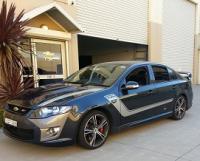
    Newb here as well I'd say black looks best when blocked and buffed... but mines rapid and the best thing is, its EASY to find in carparks.
  7. I just added a 12in JL sub to mine... just take the wires off the orig sub and wire them straight to the new sub. The JL sub made a huge difference to the systems sound, bass is now typical JL sounding bass, obviously not hitting huge dB's, but loud, high quality bass.
Account

Navigation

Search

Search

Configure browser push notifications

Chrome (Android)
  1. Tap the lock icon next to the address bar.
  2. Tap Permissions → Notifications.
  3. Adjust your preference.
Chrome (Desktop)
  1. Click the padlock icon in the address bar.
  2. Select Site settings.
  3. Find Notifications and adjust your preference.