-
WA June Cruise (Sat 23rd)
Count me in..
-
What Cars Have You Owned
1. 1996 lexcen wagon (shaggin wagon) 2. 2005 BA MKII XR6 Current 2011 FG XR6 Turbo oh and a 2012 ninja 250
-
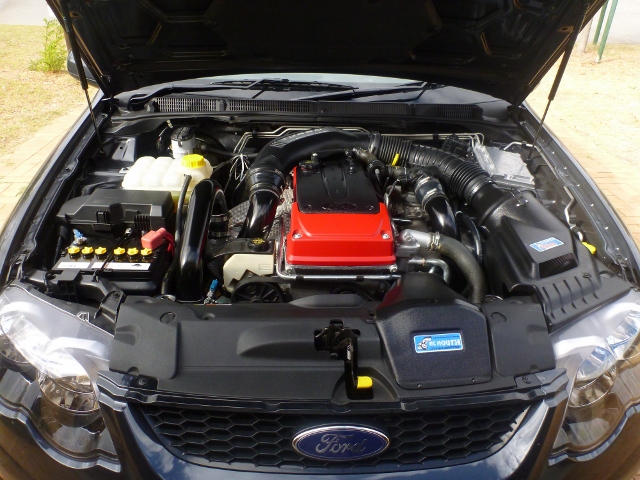
Pics Of Engine Bays
- Wa March 2012 Cruise
Count me in also... ive traded the DW90WA plates in. Everyone keeps trying to race me now for some reason not sure why haha nah jj its cause my plates say "GETSUMM"- Wa March 2012 Cruise
2011 FG Turbo.. yeah should be good to get on a cruise and meet up with some of you blokes and see ya rides- Wa March 2012 Cruise
Finally im home when a cruise is on count me in- ute register
- ute register
Hey Everyone Dan from Perth 2011 FG XR6t ute with luxury pack Colour = Edge Tinted Growler Airbox & Big Mouth Custom 3" Intake Pipe Coming Flowline auto lock lid going on soon Coolerworx Pipes on the way Gauges Ordered - Carbon Fiber Autometer Ordered SS induction triple gauge pod now to play the waiting game In the near future - Flash tune - Dump/Cat - Lower - Wa March 2012 Cruise
DW90WA
Member
-
Joined
-
Last visited
Account
Navigation
Search
Configure browser push notifications
Chrome (Android)
- Tap the lock icon next to the address bar.
- Tap Permissions → Notifications.
- Adjust your preference.
Chrome (Desktop)
- Click the padlock icon in the address bar.
- Select Site settings.
- Find Notifications and adjust your preference.
Safari (iOS 16.4+)
- Ensure the site is installed via Add to Home Screen.
- Open Settings App → Notifications.
- Find your app name and adjust your preference.
Safari (macOS)
- Go to Safari → Preferences.
- Click the Websites tab.
- Select Notifications in the sidebar.
- Find this website and adjust your preference.
Edge (Android)
- Tap the lock icon next to the address bar.
- Tap Permissions.
- Find Notifications and adjust your preference.
Edge (Desktop)
- Click the padlock icon in the address bar.
- Click Permissions for this site.
- Find Notifications and adjust your preference.
Firefox (Android)
- Go to Settings → Site permissions.
- Tap Notifications.
- Find this site in the list and adjust your preference.
Firefox (Desktop)
- Open Firefox Settings.
- Search for Notifications.
- Find this site in the list and adjust your preference.