PH1LLO
Member
-
Joined
-
Last visited
-
The one that doesn't have the heat burn.
-
-
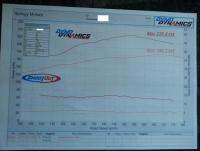
Update! Got some 60Lb injectors and a tune By HSTuning! Pulled 237Awkw at 13psi. Awesome to drive now
-
For those playing along at home, heres a pic.
-
Bump This badboy up!! This is some impressive numbers for the mods, and allllllll wheel KW!
-
Just did it with Photoshop CS mate.
-
or trade her in for a Misses that can drive?
-
It seems strange the a 2008 Model car was written off just because of Windscreen, bonnet and rad brace? Did airbags go off? Just out of curiosity. Did he mention it was a rep write off in his add? Or you didn't find out until you checked? Phil
-
Sweet man! I'll check the link out. Are you able to have the gauges showing and the radio playing at the same time?
-
So you got a TV out cable. And plugged it Into a modified ICC with RCAs?
-
Ok. So standard is 13mm, and the Furious Performance Cooler lines are 10mm. Is this an issue?Too late to edit above post. Does - 8 lines convert to a few metric measurement?Sweet, Any idea what size the lines are in the Furious Performance Kit?Can anyone tell me what size the oil lines are on the standard ZF 6 Speed, and if the lines that come in this kit are the same size? http://www.furiousperformance.com.au/retail_catalogue/TCK-TERRITORY_item.html?ref_cat_id=Coolmaster-Trasnsmission Phil