Skip to content
View in the app

A better way to browse. Learn more.

Ford XR6 Turbo.com

A full-screen app on your home screen with push notifications, badges and more.

To install this app on iOS and iPadOS
  1. Tap the Share icon in Safari
  2. Scroll the menu and tap Add to Home Screen.
  3. Tap Add in the top-right corner.
To install this app on Android
  1. Tap the 3-dot menu (⋮) in the top-right corner of the browser.
  2. Tap Add to Home screen or Install app.
  3. Confirm by tapping Install.

Merchandise At Ford Discovery Centre
Featured Replies

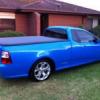
Visited the Discovery Centre today and they have XR6 Turbo caps in stock $22.50 ea, as well as a whole heap of FPV stuff.

Pursuit Ute and GT have been removed from display though :(

Regards,

Ben

post-4-1051084185.jpg

  • Author

Better shot

post-4-1051084517.jpg

  • Author

rear

post-4-1051084652.jpg

Nice background :)

I gotta pop in when I'm down there..

Is there a website for this? What is Discovery Centre?

I was going to buy a xr6t hat when I was at the motorshow in melb, but I bought a mobile phone cover instead. (I figured my 3 xr8 hats, fpv cap, gt cap, and numerous ford racing caps should be enough for the moment)

yeah I got one of the turbo hats at the clipsal 500

is this merchandise available anywhere besides the discovery centre??. ie. dealers, accessory shops, etc.

is this merchandise available anywhere besides the discovery centre??. ie. dealers, accessory shops, etc.

Lucky that you're in Canberra mate, I know just the place.

Go to the Tuggeranong Hyperdome and in a store called Rock Wallaby you can find the new Ford Racing caps, shirts, boxers shorts, the XR6T, XR8, FPV and GT hats aswell as a a BA XR8 shirt and BA bar mats. :D

Create an account or sign in to comment

Recently Browsing 0

  • No registered users viewing this page.

Account

Navigation

Search

Search

Configure browser push notifications

Chrome (Android)
  1. Tap the lock icon next to the address bar.
  2. Tap Permissions → Notifications.
  3. Adjust your preference.
Chrome (Desktop)
  1. Click the padlock icon in the address bar.
  2. Select Site settings.
  3. Find Notifications and adjust your preference.