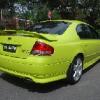
21/04/04 05:50 AM21/04/04 05:50 AM #1 Hi all, just got an interesting call from a smash repair joint after a complete price a a body shell for an XR6T....my noseyness got the netter of me and I found out..This more guy was on alfreds point bridge and some loser lost it and slammed staight up the rear end of this T so hard that the front doors are up againt the front gaurds...The driver seems to be ok, however shock and a broken heart is expected for this poor lad...it was also a HGAG driver too....
21/04/04 06:07 AM21/04/04 06:07 AM #4 You cant see hag on the road,that's why he would a been libarachied.vik
21/04/04 06:57 AM21/04/04 06:57 AM #7 Luck the colour is sooo plain that it will be easy to repaint. Undercoat
21/04/04 08:16 AM21/04/04 08:16 AM #8 Had to be hgag didn't it, puts an end to the Citric nonsense that been plauging us.Scotty
21/04/04 12:20 PM21/04/04 12:20 PM #9 Must be a bad day for HgAg's.On the way to work this morning I saw a car had run up the back of an HgAg XR6 in the back streets of Chatswood. Made me cringe.Anyone from these forums I wonder?
21/04/04 04:10 PM21/04/04 04:10 PM #10 Actually Mercury Silver being a form of silver, would be the hardest colour to match therefore the hardest colour to paint (silver is by far the hardest colour to match), still a nice colour though...


Create an account or sign in to comment