FGF6EMattyG
Legacy Donating Member
-
Joined
-
Last visited
-
Name - Matty Age - 29 Sex - Male Location - WA Occupation - Mechanical Commissioning Superintendent Current Ride - 2010 F6E Next Ride - 33 Coupe with a T in it Married - Well someone lives in my house and takes all my money.....
-
Spare wheel upside down, the car is a daily driver for the mrs, so I don't wanna leave her up $hit creek without a paddle if she gets a flat. Don't go out of your way shyfrd, but if you happen to stumble across it, the write up would be great. Cheers guys
-
Hey guys, has anyone had a removable sub box fitted to their spare wheel well? I'm looking to to install one in my car, but don't know how well it would work. Any info or pics would be appreciated. Cheers
-
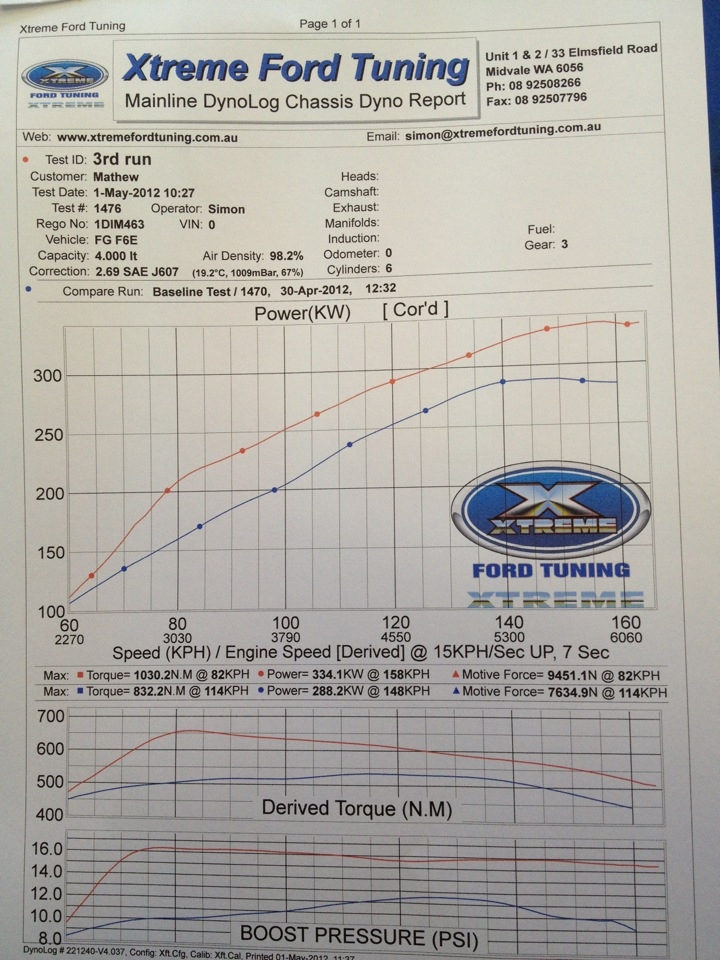
Bowie - I have no facts, but with mine making 288 stock, I reckon you could make 300 bloody easy with just a tune. But from what I know, you gotta do intercooler piping as it is prone to failure.
-
Jake - Yeah mate, will upgrade intercooler and fit new springs when we get closer to summer. SteveR - will do mate.
-
Here's the dyno guys. When and where is the cruise?

-
Oh and I forgot intercooler piping. Will throw the dyno up when I get it. Photos will be a week or two away, after she is detailed.
-
Hey guys. Thanks to Simon at XFT, the F6E is in the club with 334 rwkw @ 15psi. Mods are Cold air intake, 1000cc injectors, 3.5" dump, 5" cat and a tune. Cheers
-
2010 - F6E - Silhouette - Auto - Build No.053