September 15, 200620 yr #12 Orion will b quiet a car ←hybrid??←think he ment to say quite not quiet im guessing
September 15, 200620 yr #13 F6 Typhoon will get 19s as standard, but there will be a price rise to compensate, apart from that "Bugger All" your honour ←Good. I love my 18s
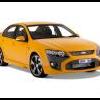
September 25, 200620 yr #14 So are they called F6 typhoons still, coz I got a letter in the mail today saying that there will be the release of the Force 6 and Force 8. So will the F6 become Force ^ instead? Anyone know??
September 25, 200620 yr #15 So are they called F6 typhoons still, coz I got a letter in the mail today saying that there will be the release of the Force 6 and Force 8. So will the F6 become Force ^ instead? Anyone know?? ←Please tell us more about this letter.
September 25, 200620 yr #16 I think the Force 6 is a Fairmont done by FPV with the F6 motor and the Force 8 is with the Boss. Could be wrong though!
September 25, 200620 yr #17 HOW UNUSUAL, A GUY GETTING FLOGGED IN HIS FIRST POST??? WEIRD ROUND HERE EH? USUAL SUSPECTS I SEE.. Welcome, and save your money for Orion.
September 25, 200620 yr #18 I think the Force 6 is a Fairmont done by FPV with the F6 motor and the Force 8 is with the Boss. Could be wrong though!←Pretty much spot on from what I've heard. Essentially they'll be luxo FPVs like the HSV Senator for example, but with choice of FPV Turbo or V8.Sounds nice.


Create an account or sign in to comment