


MRQ81
New Member
-
Joined
-
Last visited
-
Yeah it needs a clean. Perils of a work car. Cruise works. Had to put two resistors in for each side.
-
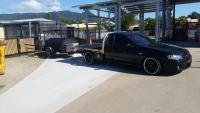
Hey guys. This is my Mk1 bf manual. Got some Simmons Fr1 wheels. A tune, pump and injectors. 260rwkw. Put a Malwood option 3 clutch and short shifter in. Lowered the tray 60mm and put some led taillights in. Putting parts together for some more grunt.
-
that's what I was thinking. Going to spool up quicker than stock anyway.
-
Manual also tow a small trailer sometimes.
-
Hi guys. First post. Got one of these baby gtx for my bf tonner. Also got a .82 rear and just wondering if I should stick with the 1.06 instead as its my daily and worried that I'll be boosting non stop. Have 3.9 diff so I'm sitting at 2200rpm at 100km / hr. Do want it responsive though. Aiming for around 330-350rwkw. Just collecting parts to do everything at once. Cheers.

