sapy44
Member
-
Joined
-
Last visited
Everything posted by sapy44
-
Well cheers for the input everyone... looks like new car warranty is up sh*t creek lol I didnt buy off ebay, got it custom tuned to the car thank god now after hearing that. I may as well go all out now then Do it all
-
Oh fair enough lol Cheers for the advise mate Going to do a bit of research before spending to much cash
-
Cop?? Im no cop mate lol Got any suggestions on types/brands of the mods you mentioned? I still have new car warranty and would like to keep, any way of getting me closer to 300rwkw without voiding it? And if for example I put new air intake on, would I need to retune the xflash?
-
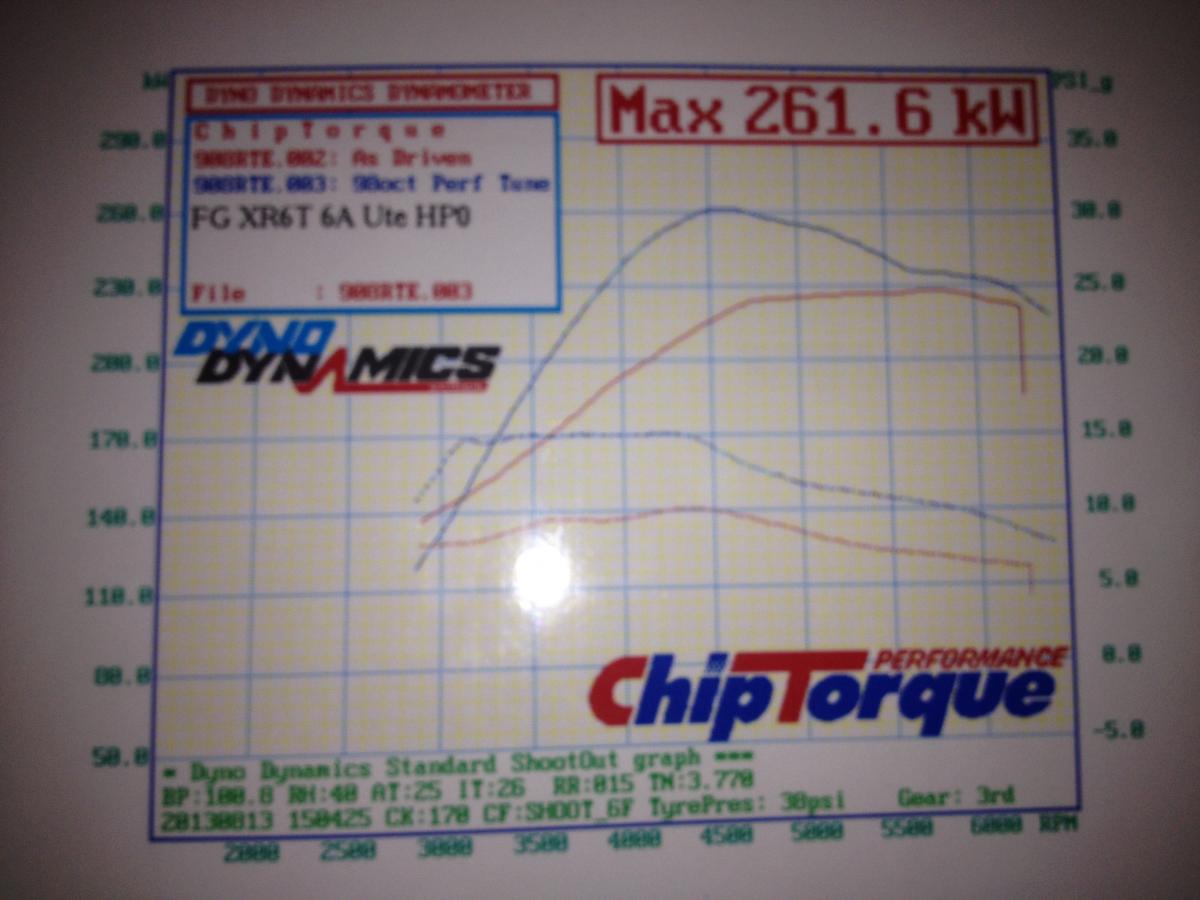
G'day all. Just joined today, Ive had my 2011 Fg Xr6t ute for few months now and started out by getting xyz coilovers and lowering blocks in the back. Got it tinted, then thought of mods that wont void NCW. So got I got the Xflash3 with with 2 tunes. Which was great its a totally different car now. It went from stock at 229rwkw to 261rwkw. Was wondering if anyone had any suggestions on how to get it up to 300rwkw without voiding NCW. I've done a bit of research and looking at air intakes, but would I need to get it re tuned if I fit one? any help or suggestions would be grateful.. Cheers Sap